> For the complete documentation index, see [llms.txt](https://extocium.gitbook.io/extocium-guide/llms.txt). Markdown versions of documentation pages are available by appending `.md` to page URLs; this page is available as [Markdown](https://extocium.gitbook.io/extocium-guide/beginners-guide/wallet-connection/common-wallet-issues/metamask-transfer-error-temporary-solution-pc-chrome-extension.md).
# MetaMask transfer error (temporary solution: PC Chrome extension)
{% tabs %}
{% tab title="ENG" %}
If the MetaMask mobile app shows only \
**\[Review]** and does not proceed when sending an NFT,\
send it via **MetaMask Chrome Extension on PC** as a workaround.
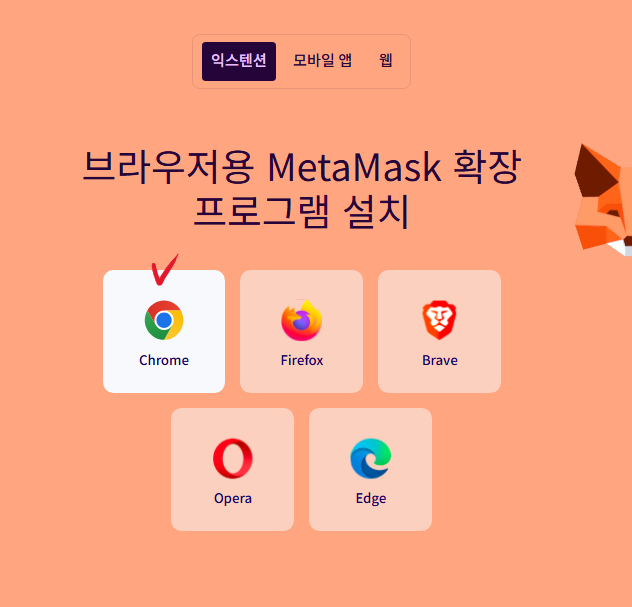
* Install the **MetaMask Chrome extension** from the official website:
*
* Click the fox icon (top-right in Chrome) → follow the steps to connect your wallet.
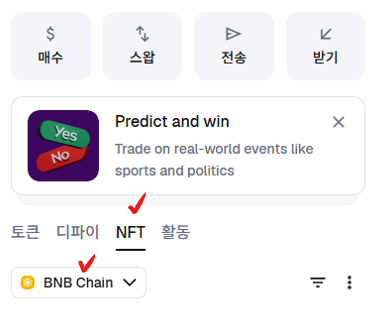
* Open the wallet → go to the **NFT tab** → select **BNB Chain**.
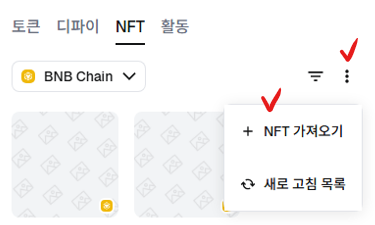
* In the NFT tab, tap **⋮ (three dots)** → **+ Import NFT**.
* Enter the following:
* **EXTOCIUM NFT Contract**: `0xcbBb5398d976B056812F7F16F3EfF0b9DB8664b5`
* **Token ID**: Check it in the in-game hero info and enter it.
* After import, the NFT becomes available to send.
### ⛔Confirm recipient wallet address (copy BNB Chain address)
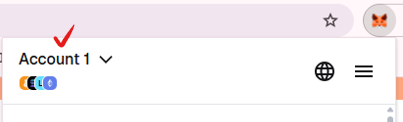
* In the wallet app, tap the **Account name** (top-left on the main screen) →
* select the **recipient wallet** →
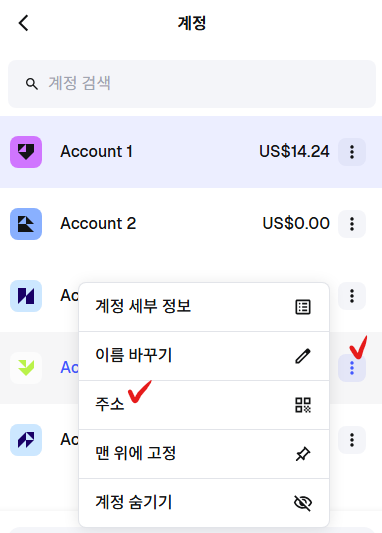
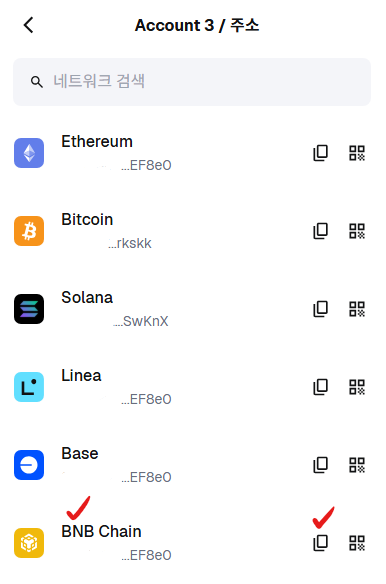
* tap **⋮** → **\[Address]** → copy the **BNB Chain address**.\
(Icon: **two overlapping pages**)
### Send
* Select the NFT → tap **\[Send]**
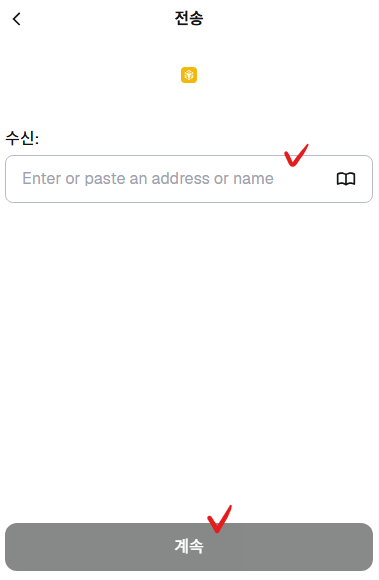
* Paste the copied address into the recipient field → tap **\[Continue]**
* Normal state: **\[Continue]** is shown (not **\[Review]**)
### ⛔Fee notice
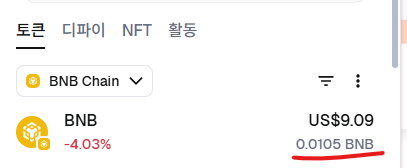
* BNB is required in the wallet for gas fees.
* Recommended: **Hold at least 0.01 BNB** → check the fee → send.
{% endtab %}
{% tab title="한국어" %}
메타마스크 앱에서 NFT 전송 시 **\[검토] 버튼만 보이고 진행되지 않는 경우**, \
**PC 크롬 확장 메타마스크**에서 전송하면 해결됩니다.
* 메타마스크 **공식 홈페이지**에서 **Chrome 확장 프로그램**을 설치합니다.
*
* 크롬 우측 상단 **여우 아이콘** → 안내에 따라 **지갑 연동**합니다.
* 지갑 접속 후 **NFT 탭**에서 **BNB Chain**을 선택합니다.
* NFT 탭 우측 **⋮(점 3개)** → **+ NFT 가져오기**를 실행합니다.
1. 계약 주소에 아래를 입력합니다.
* **EXTOCIUM NFT Contract**: `0xcbBb5398d976B056812F7F16F3EfF0b9DB8664b5`
* **Token ID**는 인게임 **영웅 정보**에서 확인 후 입력합니다.
* 등록 완료 후 전송이 가능합니다.
### ⛔수신 지갑 주소 확인 (BNB Chain 주소 복사)
* 지갑 앱 메인 좌측 상단 **Account 이름** 터치 →
*
```
```
* 지갑 목록에서 **수신 지갑 선택** →
* 해당 지갑 슬롯 우측 **⋮** → **\[주소]** → 주소 목록에서 **BNB Chain 주소**를 복사합니다.\
(아이콘: **A4용지 2장 겹친 버튼**)
### 전송 진행
9. 전송할 NFT 선택 → **\[전송]** 터치
10. 수신란에 8번에서 복사한 주소 붙여넣기 → **\[계속]** 터치
* 정상 상태: **\[검토]가 아니라 \[계속] 버튼 표시**
### ⛔수수료 주의
* 전송 시 지갑에 \*\*BNB(가스비)\*\*가 필요합니다.
* 권장: **0.01 BNB 이상** 보유 후 수수료 확인 → 전송 진행
{% endtab %}
{% tab title="日本語" %}
MetaMaskアプリでNFT送信時に **\[確認](Review)ボタンのみ表示されて先に進まない**場合、\
\*\*PCのMetaMask(Chrome拡張)\*\*から送信すると回避できます。
* 公式サイトから \*\*MetaMask(Chrome拡張)\*\*をインストールします:
*
* Chrome右上の**キツネアイコン** → 案内に従って**ウォレット連携**します。
* ウォレットを開く → **NFT**タブ → **BNB Chain**を選択します。
* NFTタブ右側の **⋮(3点)** → **+ NFTをインポート** を実行します。
* 以下を入力します:
* **EXTOCIUM NFT Contract**: `0xcbBb5398d976B056812F7F16F3EfF0b9DB8664b5`
* **Token ID**: ゲーム内の英雄情報で確認して入力します。
* 登録後、送信可能になります。
### ⛔**受取ウォレットアドレス確認(BNB Chainアドレスをコピー)**
* ウォレットアプリのメイン画面左上の**Account名**をタップ →
* 受取用ウォレットを選択 →
* **⋮** → **\[アドレス]** → **BNB Chainのアドレス**をコピーします。\
(アイコン:**重なった用紙2枚**)
### 送信
* 送信するNFTを選択 → **\[送信]**
* 受取欄にコピーしたアドレスを貼り付け → **\[続行]**
* 正常:**\[確認]ではなく\[続行]が表示**
### ⛔手数料注意
* 送信にはガス代として **BNB** が必要です。
* 推奨:**0.01 BNB以上**を保有 → 手数料確認 → 送信。
{% endtab %}
{% endtabs %}