🛑 Information on this page may differ from the current in-game data.
🔍 NFT Verification & Safe Trading Guide
This page walks you through how to verify an NFT before you buy or trade it,
so you can trade safely with confidence.
Follow the steps below to check NFT details and avoid common risks.
◾ Important Notes Before Trading
NFTs can’t be fully “deleted” once they’re created on the blockchain.
Because of this, some NFTs that have been altered (for example, after synthesis or upgrades) may still appear and get traded outside the game.
◾ For safe trading, we recommend the following
We strongly recommend trading NFTs through the in-game Market.
In the in-game Market, damaged or problematic NFTs cannot be listed or traded.
EXTOCIUM is not responsible for any losses or issues that occur through external marketplaces or off-platform trades.
Before purchasing, always verify the NFT information first.
◾How to Verify NFT Information
You can verify NFT details in two ways:
1️⃣ EXTOCIUM Official NFT SEARCH
2️⃣ bscscan.com
◾ Using EXTOCIUM Official NFT SEARCH
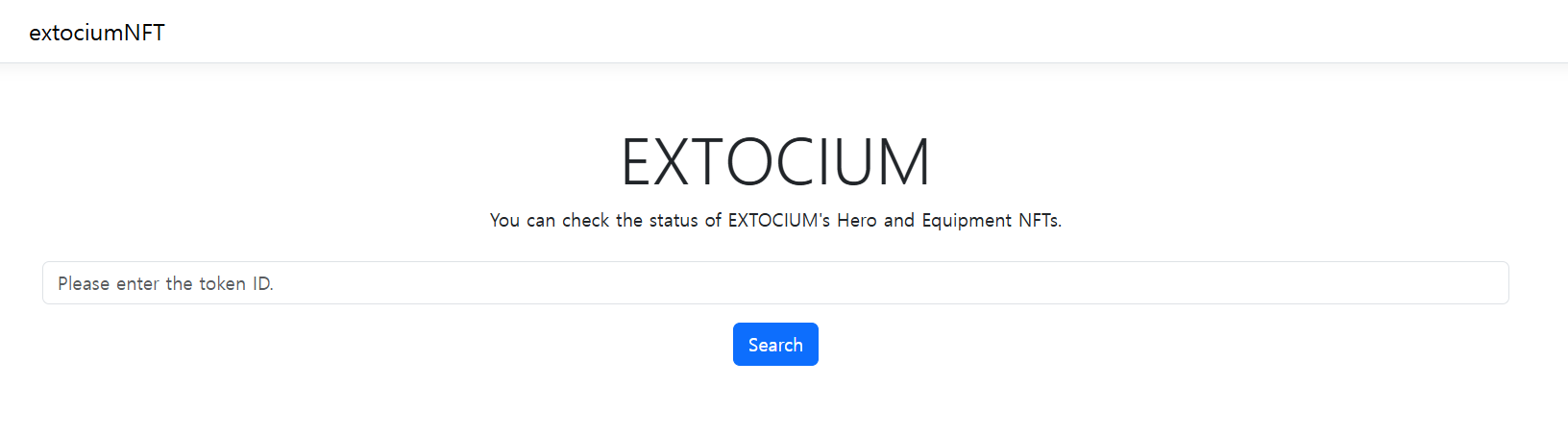
👇 With EXTOCIUM Official NFT SEARCH, you can view all NFTs in the game at a glance.
Hero Type
Current Owner
Hero Stats
Hero Level & EXP
Skill Information
Succession Status
Succession Skill Information
EXTOCIUM NFT SEARCH is designed to be easy to read, without needing to dig through complex blockchain data.
◾bscscan Link Support
At the top of the NFT SEARCH page,
you can select the bscscan link to open the NFT on bscscan instantly.
There, you can check the full transaction history and transfer records.
◾Verifying Directly on bscscan.com
If you want to view more detailed blockchain transaction records,
you can verify the NFT directly on bscscan.
1️⃣ Go to bscscan.com.
2️⃣ In the in-game NFT info window,
copy the Extocium NFT contract address and paste it into the bscscan search bar.
(All Extocium NFTs use the same contract address.)
3️⃣ Select the “NFT Transfers” tab.
4️⃣ From the recent transfer list, select an entry labeled: <NFT: XTONFT #(ID Number)>
Do not select any NFTs that are not in the NFT: XTONFT #(ID Number) format.
5️⃣ In the address bar, enter the NFT’s ID Number after the /.
6️⃣ Confirm the Creator is shown as “EXTOCIUM: Deployer”.
◾ After Verification
Once you’ve confirmed the NFT information, proceed with your trade.
Verifying first is the most reliable way to prevent scams and protect your assets.
✨
Double-check your NFT details,
trade safely, and keep your EXTOCIUM adventure worry-free.
🔍 NFT 정보 확인 및 안전 거래 안내
이 가이드는 NFT를 구매하거나 거래하기 전,
NFT의 정보를 정확하게 확인하고 안전하게 거래하기 위한 안내 페이지입니다.
NFT 정보 확인 방법과 주의 사항을 순서대로 확인할 수 있습니다.
◾ NFT 거래 시 주의 사항
NFT는 한 번 생성되면 완전히 삭제되지 않는 특성을 가지고 있습니다.
이로 인해 합성이나 강화로 상태가 변경된 NFT가 외부에서 거래되는 사례가 발생할 수 있습니다.
◾ 안전한 거래를 위해 아래 사항을 권장합니다.
NFT 거래는 인게임 마켓을 이용하는 것을 권장합니다.
인게임 마켓에서는 손상되거나 문제가 있는 NFT는 거래할 수 없습니다.
외부 거래소 이용 시 발생하는 피해에 대해서는 EXTOCIUM이 책임지지 않습니다.
NFT 구매 전, 반드시 NFT 정보를 확인해 주세요.
◾ NFT 정보 확인 방법 안내
NFT 정보는 아래 두 가지 방법으로 확인할 수 있습니다.
1️⃣ EXTOCIUM 공식 NFT SEARCH
2️⃣ bscscan.com
◾ EXTOCIUM 공식 NFT SEARCH 이용 방법
👇 EXTOCIUM 공식 NFT SEARCH에서는 게임 내 모든 NFT 정보를 한눈에 확인할 수 있습니다.