# XTO -> Gold

{% tabs %}
{% tab title="ENG" %}

## 💱 XTO → Gold Swap Guide

To exchange XTO for Gold, wallet connection and transaction approval are required.\
Please follow the instructions below.

***

### ◾ Swap Rate Information

The current XTO → Gold exchange rates are as follows.

| XTO   | GOL         |
| ----- | ----------- |
| 200   | 4,268,000   |
| 1,000 | 21,340,000  |
| 2,500 | 53,350,000  |
| 5,000 | 106,700,000 |

<p align="right"><sup><mark style="color:$warning;">※ Swap rates may change depending on circumstances.</mark></sup></p>

{% hint style="success" %}

#### ◾ Before You Begin

* [Wallet connection](/extocium-guide/beginners-guide/wallet-connection/wallet-setup/connect-your-wallet-to-extocium.md) is required.
* To approve the transaction, network fees (BNB) must be available in your wallet.
* Depending on blockchain network conditions, transaction completion may take some time.
  {% endhint %}

***

### ◾ How to Swap

#### 1️⃣ Visit NPC YEYILEL

Find the town NPC **YEYILEL** and select the **“XTO ↔ Gold”** swap menu.

<figure><img src="/files/iAqOQ1eNAETg4xGRClro" alt=""><figcaption></figcaption></figure>

***

#### 2️⃣ Select Swap Amount

Choose the amount of XTO you wish to exchange.\
Once selected, you can review the following information:

> * **The amount of XTO to be exchanged**
> * **Estimated transaction fee (BNB)**
> * **The final amount of Gold you will receive**

After reviewing the details, select the **“Confirm”** button.

<figure><img src="/files/MLzxRh3SgPJsqIqqPCVo" alt=""><figcaption></figcaption></figure>

{% hint style="info" %}
※ The transaction fee (BNB) may vary depending on BSC network conditions.\
※ The fee displayed in the game is for reference only.\
※ The exact final fee can be confirmed in your wallet approval window.
{% endhint %}

***

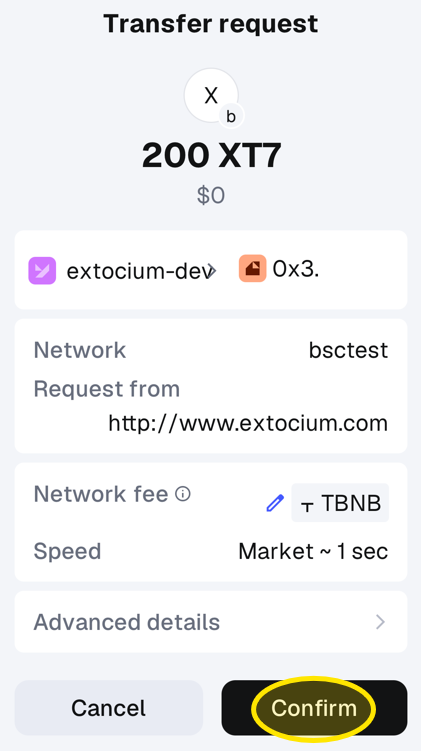
#### 3️⃣ Approve the Transaction in Your Wallet

A wallet approval window will appear.\
Please review the transaction details and approve it.

<div align="center"><figure><img src="/files/Yb2X9Lk7X0rn5ivn2xTv" alt="" width="211"><figcaption><p>This is an example shown using test coins.</p></figcaption></figure></div>

{% hint style="warning" %}
**If the transaction is not approved, the swap will not proceed.**
{% endhint %}

***

### ◾ Swap Complete

Once the transaction is successfully completed, Gold will be credited.

<figure><img src="/files/HIYFUaOkcZfm27e07BN1" alt=""><figcaption></figcaption></figure>

<p align="center">👇</p>

<figure><img src="/files/UXJbE8int2hWgxWpI26W" alt=""><figcaption></figcaption></figure>

{% hint style="info" %}
Due to blockchain characteristics, processing may take some time.
{% endhint %}

***

### ◾ Having Wallet Connection Issues?

[If you experience wallet connection errors, please refer to the Wallet Connection Guide page.](/extocium-guide/beginners-guide/wallet-connection/common-wallet-issues.md)
{% endtab %}

{% tab title="한국어" %}

## 💱 XTO → Gold 스왑 가이드

XTO를 Gold로 교환하려면 지갑 연결과 거래 승인이 필요합니다.\
아래 안내에 따라 진행해 주세요.

***

### ◾ 스왑 비율 안내

현재 XTO → Gold 교환 비율은 다음과 같습니다.

| XTO   | GOL         |
| ----- | ----------- |
| 200   | 4,268,000   |
| 1,000 | 21,340,000  |
| 2,500 | 53,350,000  |
| 5,000 | 106,700,000 |

<p align="right"><sup><mark style="color:$warning;">※ 스왑 비율은 상황에 따라 변경될 수 있습니다.</mark></sup></p>

{% hint style="success" %}

#### ◾ 이용 전 확인 사항

* [지갑 연결](/extocium-guide/beginners-guide/wallet-connection/wallet-setup/connect-your-wallet-to-extocium.md)이 반드시 필요합니다.
* 거래를 승인하려면 지갑 내에 네트워크 수수료(BNB)가 필요합니다.
* 블록체인 네트워크 상태에 따라 거래 완료까지 시간이 소요될 수 있습니다.
  {% endhint %}

***

### ◾ 스왑 진행 방법

#### 1️⃣ NPC 예이렐 방문

마을 NPC **예이렐**을 찾아가 **‘XTO ↔ Gold’** 스왑 메뉴를 선택합니다.

<figure><img src="/files/iAqOQ1eNAETg4xGRClro" alt=""><figcaption></figcaption></figure>

***

#### 2️⃣ 스왑 수량 선택

교환할 XTO 수량을 선택합니다.\
수량을 선택하면 다음 정보를 확인할 수 있습니다.

> * **교환할 XTO 수량**
> * **예상 트랜잭션 수수료(BNB)**
> * **최종적으로 받을 Gold 수량**

표시된 내용을 확인한 후 **‘확인’** 버튼을 선택합니다.

<figure><img src="/files/MLzxRh3SgPJsqIqqPCVo" alt=""><figcaption></figcaption></figure>

{% hint style="info" %}
※ 트랜잭션 수수료(BNB)는 BSC 네트워크 상황에 따라 변동될 수 있습니다.\
※ 게임 화면에 표시되는 수수료는 참고용입니다.\
※ 정확한 최종 수수료는 지갑의 승인 창에서 확인할 수 있습니다.
{% endhint %}

***

#### 3️⃣ 지갑에서 거래 승인

지갑 승인 창이 표시됩니다.\
거래 내용을 확인한 뒤 승인해 주세요.

<figure><img src="/files/Yb2X9Lk7X0rn5ivn2xTv" alt="" width="211"><figcaption><p>테스트용 코인으로 진행된 예시입니다.</p></figcaption></figure>

{% hint style="warning" %}
**승인하지 않으면 스왑이 진행되지 않습니다.**
{% endhint %}

***

### ◾ 스왑 완료

거래가 정상적으로 완료되면 Gold가 지급됩니다.

<figure><img src="/files/HIYFUaOkcZfm27e07BN1" alt=""><figcaption></figcaption></figure>

<p align="center">👇</p>

<figure><img src="/files/UXJbE8int2hWgxWpI26W" alt=""><figcaption></figcaption></figure>

{% hint style="info" %}
블록체인 특성상 처리에 다소 시간이 걸릴 수 있습니다.
{% endhint %}

***

### ◾ 지갑 연결 문제가 발생했나요?

[지갑 연결 오류가 발생한 경우, 지갑 연결 안내 페이지를 참고해 주세요.](/extocium-guide/beginners-guide/wallet-connection/common-wallet-issues.md)
{% endtab %}

{% tab title="日本語" %}

## 💱 XTO → Gold スワップガイド

XTOをGoldに交換するには、ウォレット接続と取引承認が必要です。\
以下の案内に従って進めてください。

***

### ◾ スワップ比率案内

現在のXTO → Gold交換比率は次のとおりです。

| XTO   | GOL         |
| ----- | ----------- |
| 200   | 4,268,000   |
| 1,000 | 21,340,000  |
| 2,500 | 53,350,000  |
| 5,000 | 106,700,000 |

<p align="right"><sup><mark style="color:$warning;">※ スワップ比率は状況に応じて変更される場合があります。</mark></sup></p>

{% hint style="success" %}

#### ◾ 利用前の確認事項

* [ウォレット接続](/extocium-guide/beginners-guide/wallet-connection/wallet-setup/connect-your-wallet-to-extocium.md)が必須です。
* 取引を承認するには、ウォレット内にネットワーク手数料（BNB）が必要です。
* ブロックチェーンネットワークの状況により、取引完了まで時間がかかる場合があります。
  {% endhint %}

***

### ◾ スワップ進行方法

#### 1️⃣ NPC イェイレル訪問

町のNPC **イェイレル** を訪れ、**「XTO ↔ Gold」**&#x30B9;ワップメニューを選択します。

<figure><img src="/files/iAqOQ1eNAETg4xGRClro" alt=""><figcaption></figcaption></figure>

***

#### 2️⃣ スワップ数量選択

交換するXTO数量を選択します。\
数量を選択すると、以下の情報を確認できます。

> * **交換するXTO数量**
> * **予想トランザクション手数料（BNB）**
> * **最終的に受け取るGold数量**

内容を確認した後、**「確認」**&#x30DC;タンを選択してください。

<figure><img src="/files/MLzxRh3SgPJsqIqqPCVo" alt=""><figcaption></figcaption></figure>

{% hint style="info" %}
※ トランザクション手数料（BNB）はBSCネットワークの状況により変動する場合があります。\
※ ゲーム画面に表示される手数料は参考値です。\
※ 正確な最終手数料は、ウォレットの承認画面で確認できます。
{% endhint %}

***

#### 3️⃣ ウォレットで取引承認

ウォレットの承認画面が表示されます。\
取引内容を確認した後、承認してください。

<figure><img src="/files/Yb2X9Lk7X0rn5ivn2xTv" alt="" width="211"><figcaption><p>테스트용 코인으로 진행된 예시입니다.</p></figcaption></figure>

{% hint style="warning" %}
**承認しない場合、スワップは進行しません。**
{% endhint %}

***

### ◾ スワップ完了

取引が正常に完了すると、Goldが支給されます。

<figure><img src="/files/HIYFUaOkcZfm27e07BN1" alt=""><figcaption></figcaption></figure>

<p align="center">👇</p>

<figure><img src="/files/UXJbE8int2hWgxWpI26W" alt=""><figcaption></figcaption></figure>

{% hint style="info" %}
ブロックチェーンの特性上、処理に多少時間がかかる場合があります。
{% endhint %}

***

### ◾ ウォレット接続に問題がありますか？

[ウォレット接続エラーが発生した場合は、ウォレット接続案内ページをご確認ください。](/extocium-guide/beginners-guide/wallet-connection/common-wallet-issues.md)
{% endtab %}
{% endtabs %}

<p align="right"><sup><em>※ This guide was written based on the game status as of February 11, 2026,</em></sup> <br><sup><em>and its contents may change with future updates</em></sup></p>


---

# Agent Instructions: Querying This Documentation

If you need additional information that is not directly available in this page, you can query the documentation dynamically by asking a question.

Perform an HTTP GET request on the current page URL with the `ask` query parameter:

```
GET https://extocium.gitbook.io/extocium-guide/xto-token/xto-swap-service/xto-greater-than-gold.md?ask=<question>
```

The question should be specific, self-contained, and written in natural language.
The response will contain a direct answer to the question and relevant excerpts and sources from the documentation.

Use this mechanism when the answer is not explicitly present in the current page, you need clarification or additional context, or you want to retrieve related documentation sections.